Media and integrity
Removable media model
Backup and restore media are controlled transport media. They can be USB keys or USB disks, depending on the custody model approved for the operation.
|
Mounting and unmounting removable media is an access operation, not an authorization to edit backup files manually. The appliance copies or stages files through controlled workflows and checks size and SHA-256 values during copy, staging, backup, restore, export, and inspection operations. Operators must not rename, edit, decompress, recompress, or otherwise modify backup files directly on removable media. |
| Media phase | Expected behavior | Integrity control |
|---|---|---|
Mount |
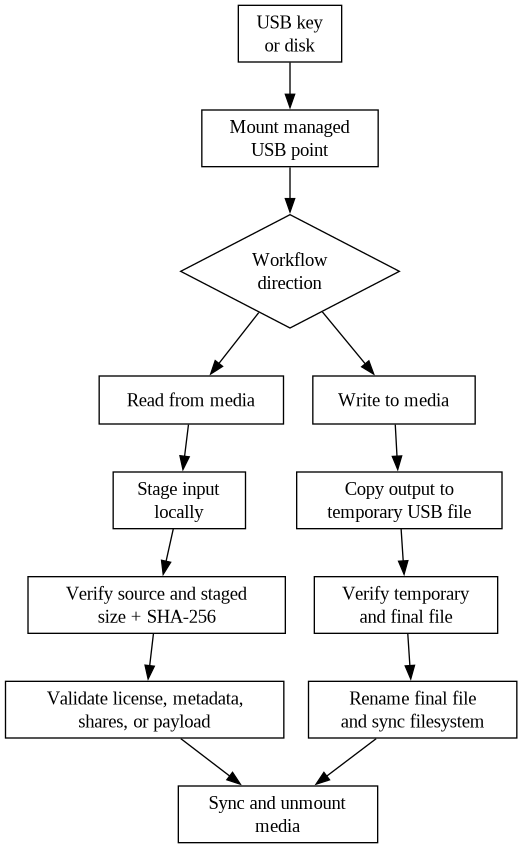
The appliance mounts the selected USB key or disk under the managed USB mountpoint when a workflow needs input or output media. |
The operator verifies the media label and expected file list before selecting files. When the managed mountpoint is already occupied, export workflows can keep the current media, unmount it and mount another one, or return without continuing. |
Stage from media |
The following workflows copy selected files from USB media to a local temporary staging area before validation:
|
The appliance compares source and staged file size and SHA-256 hash. If verification fails, the workflow stops before runtime changes. The staging pipeline rejects symbolic links and paths that escape the managed USB mountpoint. |
Copy to media |
Backup and export workflows copy generated files to USB media through a temporary destination, sync the filesystem, then rename the final file. |
The appliance compares source and destination size and SHA-256 hash before reporting success. |
Unmount |
The appliance syncs and unmounts the managed USB mountpoint before the operator removes the media. |
A failed unmount is treated as an operational issue and must be recorded before media is removed. |
Custody |
The following are stored according to the operation custody plan:
|
The operation report records:
|
File selection safeguards
USB-backed workflows reject hidden or internal paths before the selected input is consumed. Do not use files from:
-
dotfile paths
-
hidden directories
-
.DS_Store -
.Trash-* -
symbolic links
-
paths outside the managed USB mountpoint.
For Shamir and YubiHSM restore shares stored on separate USB keys, the appliance can stage one share locally, unmount the current key, and prompt for the next key. This keeps each custodian media item independent while still giving the restore helper local verified inputs.
When optional per-share password protection was selected during backup, each
Shamir share remains an encrypted base64 envelope while stored or transported.
After the staged encrypted-file hash is verified, the appliance requests the
password for that specific share and recalculates its password_verifier from
the metadata password_kdf, password_salt, and password_cost before
decryption. It then decrypts the share only into private local staging and
validates the decrypted-content hash before counting it toward the threshold.
Share passwords are never stored in bundle metadata, HMAC sidecars, logs, or
Recovery Kits and must be conveyed through the approved independent custody
process. The verifier cannot recover a lost password.