HSM Integration
Description
The HSM menu installs vendor middleware before Stream starts or before an existing appliance state is restored.
After middleware installation, configure the HSM in Stream as a PKCS#11 keystore.
Supported HSM integrations
The appliance integrates the following workflows. Use vendor documentation and the approved qualification record to select the middleware release for the target environment.
| Provider | Integrated scope |
|---|---|
Qualification boundary |
Thales Luna |
Client installation for Network, PCIe, Backup, Remote PED, and USB profiles. |
Qualify the middleware, target Luna model, firmware, operating system, driver, and connection profile. |
Entrust nShield |
Middleware installation, policy prompts, and PKCS#11 configuration. |
Qualify the middleware, target model, firmware, Security World, key policy, and host configuration. |
Proteccio Bull |
Middleware installation, |
Qualify the middleware, target HSM, virtual HSM, and network configuration. |
YubiHSM 2 |
Offline management tools, connector, setup workflow, and PKCS#11 integration. |
Qualify the middleware, device firmware, hardware, authentication policy, and ceremony. |
Mastercard PKCS#11 tools |
Provider-neutral discovery, public-object handling, key and CSR operations, and reports. |
These tools do not qualify an HSM or its vendor module. |
The HSM > VERIFIED screen displays the package information carried by the
running appliance. Use it as local evidence, not as a universal vendor
compatibility statement. Record the selected middleware, its integrity
evidence, the target HSM and firmware, and the qualification result.
Supported appliance installers
| HSM | Menu entry | Middleware input | Stream configuration |
|---|---|---|---|
|
|
PKCS#11 library and configuration from the installed YubiHSM middleware. |
|
|
Approved nShield middleware ISO. |
|
|
|
Approved Luna middleware archive and client configuration. |
For Luna USB-only installation, the appliance preserves the vendor-maintained
|
|
|
Approved Proteccio middleware ISO and client configuration. |
|
Vendor preparation
-
YubiHSM
-
nShield Edge
-
Thales Luna
-
Proteccio Bull
Prepare:
-
The YubiHSM device
-
Approved middleware packages
-
Authentication key IDs
-
Connector settings
-
PKCS#11 configuration values
Use YubiHSM for the appliance workflow and YubiHSM PKCS#11 for vendor PKCS#11 behavior.
Prepare:
-
The nShield middleware ISO
-
Security World information
-
Remote Administration policy
-
Extractability decision
-
PKCS#11 library path
Use nShield Edge for the appliance workflow and Entrust nShield documentation for vendor PKCS#11 behavior.
Prepare:
-
The Luna client archive
-
Partition information
-
PKCS#11 library path
Offline CA creates or preserves Chrystoki.conf during middleware
installation according to the selected Luna profile; the operator does not
prepare this file separately. For USB-only, prepare the physical device and the
approved Luna Client archive. Use Thales Luna for the appliance
workflow and Thales Luna PKCS#11 for vendor PKCS#11 behavior.
Prepare:
-
The Proteccio middleware ISO
-
Virtual HSM or slot information
-
Client configuration
-
PKCS#11 library path
-
Backup policy reference
Use Proteccio Bull for the appliance-driven middleware installation workflow, Stream PKCS#11 configuration, and backup expectations.
General workflow
-
Boot the appliance.
-
Choose
CreateorRestore. -
Open
HSM. -
Select
INSTALL. -
Select the middleware required by the target HSM.
-
Provide the middleware file when prompted.
-
Complete vendor-specific policy prompts.
-
Review the installation result.
-
Start or restore Stream.
-
In Stream, configure a
PKCS#11keystore with the approved library path, slot, user type, and PIN.
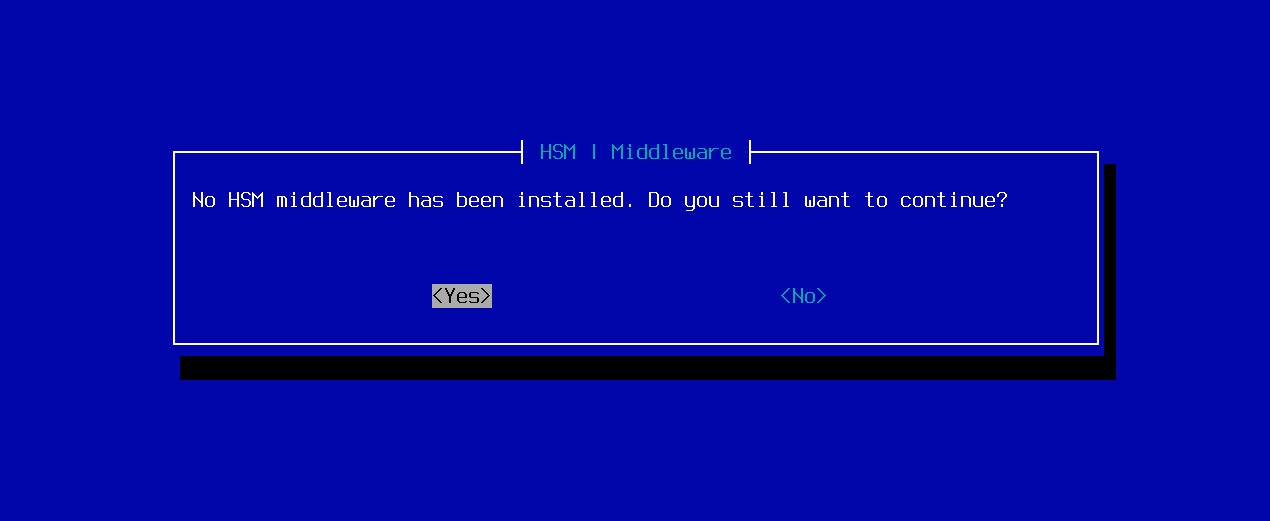
When no HSM middleware has been installed and the operator continues toward START or RESTORE, the appliance displays a confirmation prompt.
Proceed only when the approved operation is a software-keystore operation or when the required HSM runtime is already available by another approved procedure.
Runtime detection and tools
The appliance checks installed middleware before the operator continues to START or the first RESTORE action.
The detection covers:
-
YubiHSM runtime markers, YubiHSM tools, and
/etc/yubihsm_pkcs11.conf -
Luna client binaries and
Chrystoki.conf -
nShield nFast tools
-
Proteccio PKCS#11 library and
proteccio.rc.
After YubiHSM middleware is detected, the top-level YUBI menu exposes connection, key-listing, backup, and restore actions.
After Proteccio middleware is detected, the top-level PROTECCIO menu remains available as middleware context and points operators to the generic PKCS#11 tools.
PKCS#11 operations menu
The PKCS11 menu appears only when at least one PKCS#11 module is detected or configured.
Detection can come from the active PKCS#11 module configuration, managed provider module paths, p11-kit module files, known middleware library locations, or an explicitly configured extra module path.
Use this menu for provider-neutral PKCS#11 checks before configuring Stream:
| Menu path | Purpose |
|---|---|
|
Display configured and detected PKCS#11 modules. |
|
Select the active PKCS#11 module for generic operations. |
|
List slots for the active module. |
|
Select an installed provider, such as Proteccio, YubiHSM, Luna, or nShield, and list slots through the provider module. |
|
Record the numeric slot selected for later PKCS#11 operations. |
|
List slots with a token present. |
|
Display mechanisms supported by the active module and slot. |
|
Inspect visible PKCS#11 objects, export public certificates/public keys/data objects with |
|
Import public objects only: certificates with |
|
Generate a PKCS#10 CSR with Mastercard |
|
Delete exactly one selected object with strong confirmation. Token initialization, PIN changes, reset, key wrapping, object move/copy, and attribute mutation are not exposed as generic workflows. |
|
Generate a non-sensitive inventory report. Public objects are listed without login; every section records |
The integrated tools support discovery, public-object import and export, guarded key generation, CSR creation, deletion with confirmation, and non-sensitive reports. If the tools are unavailable, the menu remains visible for diagnostics and reports the missing dependency.
Private-key transfer, token initialization or reset, PIN administration, key wrapping, object move or copy, and attribute changes are outside this generic workflow. Keep PINs, passwords, and private-key material out of reports. Begin with read-only discovery, then configure Stream with the approved module, slot, user type, and PIN.
Verified middleware screen
The HSM > VERIFIED screen lists the middleware identity, runtime paths, and
qualification information available on the running appliance. Use it to check
that the prepared input matches the approved operation record before recording
the target-specific qualification.
HSM procedures
Use the dedicated page for the selected HSM:
-
See YubiHSM
-
See nShield Edge
-
See Thales Luna
-
See Proteccio Bull.