Thales Luna
Description
Stream Offline CA installs Thales Luna Network, PCIe, Backup, Remote PED, and Luna USB middleware from an approved Luna Client archive. The Luna USB HSM path adds safe archive validation, read-only preflight checks, the official vendor installer, and post-install diagnostics.
This workflow does not initialize the HSM, request a PIN, create or rename a partition, change a policy, generate a key, or update firmware.
|
A successful middleware installation does not qualify the physical HSM. The
diagnostic reports middleware, driver, USB device, permissions, Luna slots, and
generic PKCS#11 discovery separately. An installation without connected
hardware can be valid while hardware checks report |
Compatibility scope
The appliance integrates the Luna Client installation workflow but does not certify every combination of middleware, operating system, HSM, firmware, driver, Secure Boot policy, or connection profile. Select an approved vendor release and qualify the complete target combination before production.
Prerequisites
Prepare the approved Luna Client archive and its integrity evidence, the target HSM model and firmware, the applicable Thales compatibility matrix, and the PKCS#11 values approved for Stream. Hardware validation also requires the physical device, administrator access to the appliance, and sufficient extraction space.
The image contains the prerequisites used by the installation workflow. The Luna preflight observes the host state; it does not replace the operating system, modify GRUB, disable Secure Boot or SELinux, or create permissive udev rules. Only the official Thales installer can build and install the vendor driver.
Install Luna middleware
-
Boot the appliance into
CreateorRestore. -
Open
HSM > INSTALL > LUNA. -
Select the approved Luna Client
.tararchive.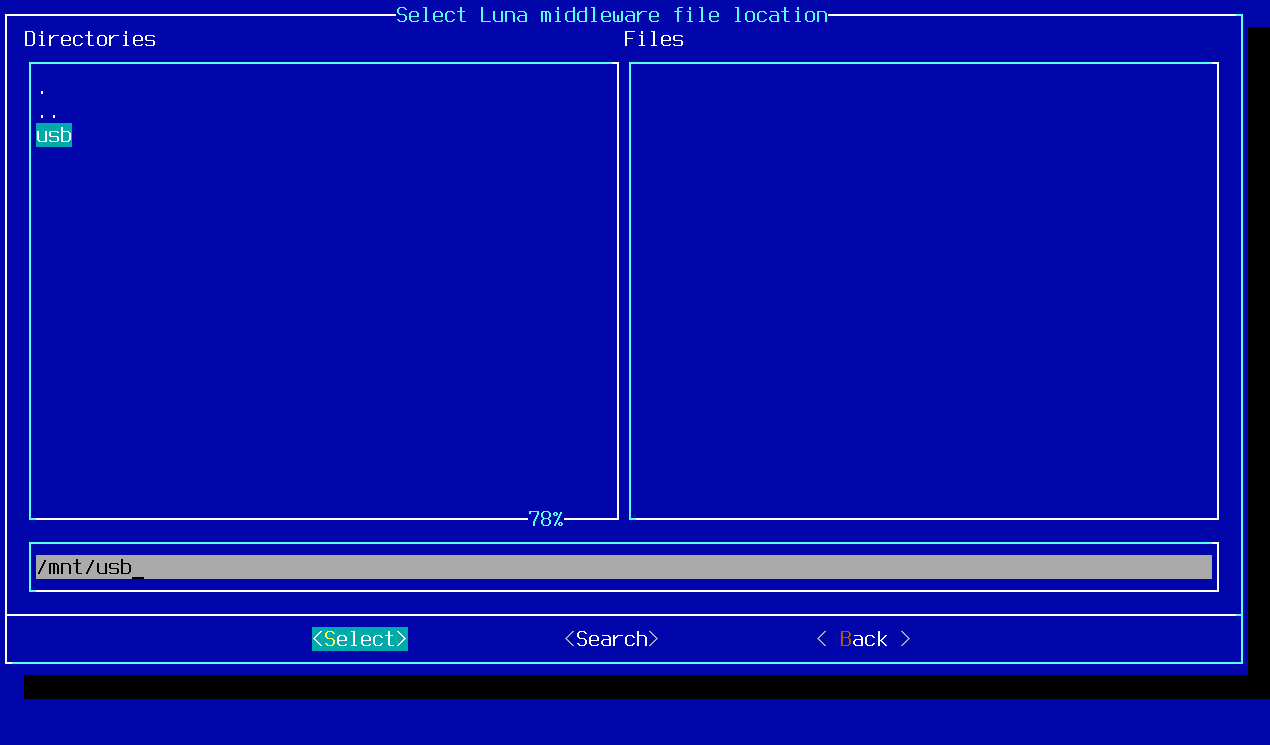
-
Select the required Luna products. All products are cleared initially. For USB-only installation, select only
Luna USB HSM. -
Review the archive path, SHA-256, detected version and architecture, detected USB components, vendor arguments, and non-destructive scope.
-
Review the preflight results. Do not accept a compatibility warning without a recorded qualification decision.
-
Confirm the installation.
-
Verify that the official installer returns a zero exit status and review the software and hardware postflight results.
The USB selection passes -p usb once to the official install.sh. A success
message in vendor output cannot override a non-zero installer exit status.
Archive safety controls
Before extraction, the appliance verifies that the archive:
-
Exists, is readable, and is a valid tar archive
-
Contains only safe relative paths
-
Allows only internal relative symbolic links that remain inside the archive; rejects hard links, special files, absolute paths, and path traversal
-
Contains the x86_64 installer at
64/install.sh -
Advertises support for the USB product
-
Contains recognized Luna USB driver source components
-
Matches the expected architecture.
Extraction occurs in a private temporary directory only after these checks. The installer result is reported provider by provider; a failed Luna installation is not hidden by the result of another middleware operation.
Interpret installation states
| State | Meaning | Operator action |
|---|---|---|
|
The observed condition passed. |
Continue and retain the non-secret check output. |
|
A non-blocking difference or an unproven qualification condition exists. |
Review the detail and document the acceptance decision. |
|
The installer cannot safely continue or a required software condition failed. |
Correct the image or use an approved combination. The workflow does not repair the kernel or dependencies. |
|
The hardware, driver module, device node, or public slot is not visible. |
Check the physical connection, driver, udev rule, and permissions. |
|
Software installation may be valid, but the complete hardware chain is not demonstrated. |
Run the target hardware qualification procedure. |
The preflight reports the operating system, architecture, running kernel,
matching development tree, required tools, free space, existing Luna install,
stream user, hsmusers group, Secure Boot, and SELinux state.
Chrystoki.conf policy
USB only
For a USB-only selection, Stream Offline CA:
-
Creates a protected
0600backup when/etc/Chrystoki.confalready exists -
Preserves the file created or maintained by the Thales installer
-
Does not copy the repository’s historical Network template
-
Does not inject Network addresses, NTLS certificates, or client paths
-
Never writes the full configuration content to the installation log.
Network or mixed Network and USB
The existing Network workflow retains its historical configuration behavior. When Network and USB are selected together, the Network handling remains in place and the USB checks are added. This mixed profile requires explicit target qualification. PCIe, Backup, or Remote PED selections without USB keep their existing behavior.
Post-install checks
The postflight reports separately:
-
Luna Client directory and version
-
lunacm -
/etc/Chrystoki.conf -
libCryptoki2_64.soand its ELF metadata -
Detected vendor driver module,
vermagic, signature information, and load state -
USB device and vendor device node
-
Device group, mode, and effective access for
stream -
Public Luna slots visible without authentication
-
Generic PKCS#11 slot discovery.
Run the read-only support diagnostic again with:
/opt/offline_ca/hsm/luna-usb.sh diagnoseThe primary installer log is
/opt/offline_ca/log/luna_installation.log. Redact environment names, addresses,
serial numbers, and other unnecessary identifiers before sharing it. Never add
PINs, passwords, private keys, or other authentication material.
Stream startup after Luna USB installation
Luna USB middleware installation does not install a systemd startup gate or a
dedicated kiosk readiness page. CREATE, RESTORE, and START retain the
standard Stream startup workflow used by every middleware.
Before configuring or using a Luna PKCS#11 keystore, validate the expected
public slot under the stream identity. A visible USB device or a successful
root command alone is not proof that Stream can access the token.
Inspect PKCS#11 slots
After middleware installation:
-
Open
PKCS11 > DISCOVERY > PROVIDER-SLOTS. -
Select
LUNA. -
Verify that the expected public slots are visible.
-
During qualification, compare the result with the non-destructive LunaCM view:
/usr/safenet/lunaclient/bin/lunacm -q "slot list"No PIN is required for these discovery steps. Do not initialize the HSM to make a diagnostic pass.
Configure the Stream keystore
-
Start or restore Stream only after the approved HSM readiness criteria are met.
-
In Stream, open Keystores and keys.
-
Add a
PKCS#11keystore. -
Enter the approved Luna library path, normally
/usr/safenet/lunaclient/lib/libCryptoki2_64.so. -
Parse the library and select the approved slot or partition.
-
Enter the approved user type and PIN through the Stream interface.
-
Save the keystore and verify access to the expected token.
Partition, slot, user type, PIN custody, and HSM backup procedures depend on the target Luna configuration and remain outside middleware installation.
Troubleshooting
| Symptom | Interpretation | Check |
|---|---|---|
Archive refused |
Missing, unreadable, unsafe, linked, incompatible, or USB-incapable archive. |
Verify provenance, exact filename, and SHA-256. Do not repack the vendor archive. |
Kernel development check fails |
The running kernel and its development tree are incompatible. |
Use the approved appliance image. Do not install arbitrary packages during the ceremony. |
Driver module missing or |
The vendor driver was not built for the running kernel. |
Review the Thales installer log and compatibility decision. |
Secure Boot enabled and module not loaded |
The host may reject an unsigned or untrusted Linux driver. |
Follow the approved module-signing procedure; do not disable Secure Boot as the default remedy. |
USB visible but vendor node absent |
USB transport works, but the driver or udev did not create the node. |
Check the module, vendor udev rules, and kernel journal. |
Vendor node reports access denied |
Group, mode, or effective |
Verify |
No slot is visible |
The middleware loads but no public token-present slot is available. |
Check power, USB connection, device state, and Luna logs without initializing the HSM. |
Stream cannot access the expected Luna token after startup |
The middleware may be installed while the driver, device permissions, or token visibility for |
Run |
Security boundaries
The Luna USB middleware workflow:
-
Does not collect a user PIN or SO PIN
-
Does not store secrets
-
Performs no authenticated cryptographic operation
-
Deploys no NTLS material for USB-only installation
-
Requires restricted device access through
hsmusers; world access such as0666is not accepted -
Does not disable kernel, Secure Boot, or SELinux protections
-
Does not arbitrarily load or unload a kernel module for diagnostic purposes.
Rollback
-
Retain the installation log and any timestamped local backup of
Chrystoki.conf. -
Do not erase HSM data or delete a partition.
-
Restore configuration only through an approved procedure with the required ownership and permissions.
-
Use the official Thales uninstall procedure for the installed Luna Client version. Stream Offline CA does not implement a custom Luna uninstaller.
-
Re-run non-destructive checks after rollback.