Introduction
Description
Stream Offline CA is an offline appliance used to operate sensitive Certification Authority material from a controlled Live USB environment.
It starts an operator console on tty1 and opens Stream in a kiosk session on tty2 after the appliance workflow is ready.
Use Stream for CA, keystore, certificate, CRL, and administration tasks. Use Stream Offline CA when those operations must run from an offline runtime with removable-media workflows, HSM middleware installation, backup, restore, export, inspection, and ceremony record collection.
Appliance scope
| Component | Scope |
|---|---|
Operating system |
Rocky Linux, x86_64. |
Stream |
The Stream release documented by this guide. |
HSM support |
The provider workflows listed in HSM Integration. The exact middleware release, hardware, firmware, operating system, driver, and policy must be qualified for the target environment. |
Recommended hardware
| Component | Minimum recommendation |
|---|---|
CPU |
x86_64 workstation with at least 2 CPU cores. |
Memory |
At least 8 GB RAM. |
Storage |
At least 32 GB. |
USB |
|
Console |
Local display and keyboard supported by the Linux console. |
HSM |
Vendor-supported HSM setup validated on the target workstation before the production operation. |
Network |
Not required for normal offline operation. Enable only during an approved maintenance window. |
Keystore options
Stream Offline CA supports both Stream-managed software keystores and PKCS#11 HSM keystores. Select the keystore model before the ceremony starts, then follow Keystore configuration for Stream configuration.
| Topic | Software keystore | HSM / PKCS#11 keystore |
|---|---|---|
Operational model |
Keys are managed by Stream and restored with Stream state. |
Keys are managed through a PKCS#11 library and protected by the selected HSM. |
Backup model |
Back up Stream state and software-keystore material. |
Back up Stream state and HSM state according to the selected HSM procedure. |
HSM support
| HSM | Appliance menu | Use the dedicated page for |
|---|---|---|
|
|
|
|
|
|
|
|
|
|
|
Main workflows
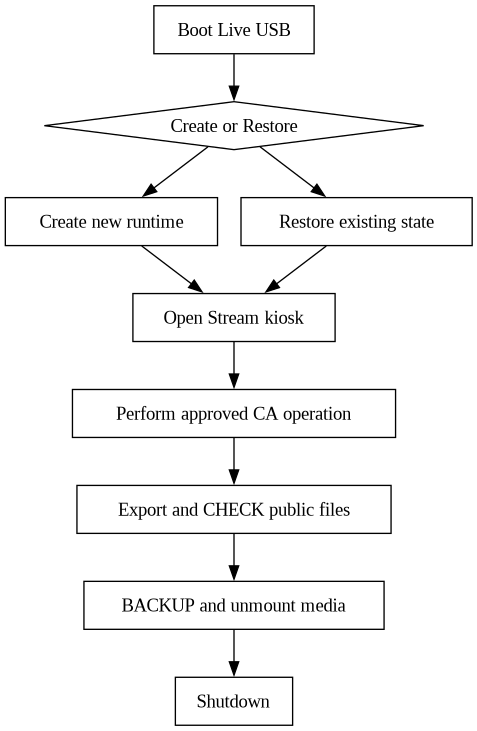
| Workflow | Use it for |
|---|---|
Boot the Live USB, confirm date/time/keymap, and choose |
|
|
|
Recover an existing offline CA state before:
|
|
|
|
|
|
Prepare a blank Live USB with the latest approved Stream Offline CA ISO. |
|
Install vendor middleware and prepare Stream PKCS#11 keystore configuration. |
|
|